Building a Full-Stack Java Project with Spring Boot & React
A practical walkthrough of building a full-stack Java app with Spring Boot, React, JWT auth, and PostgreSQL.
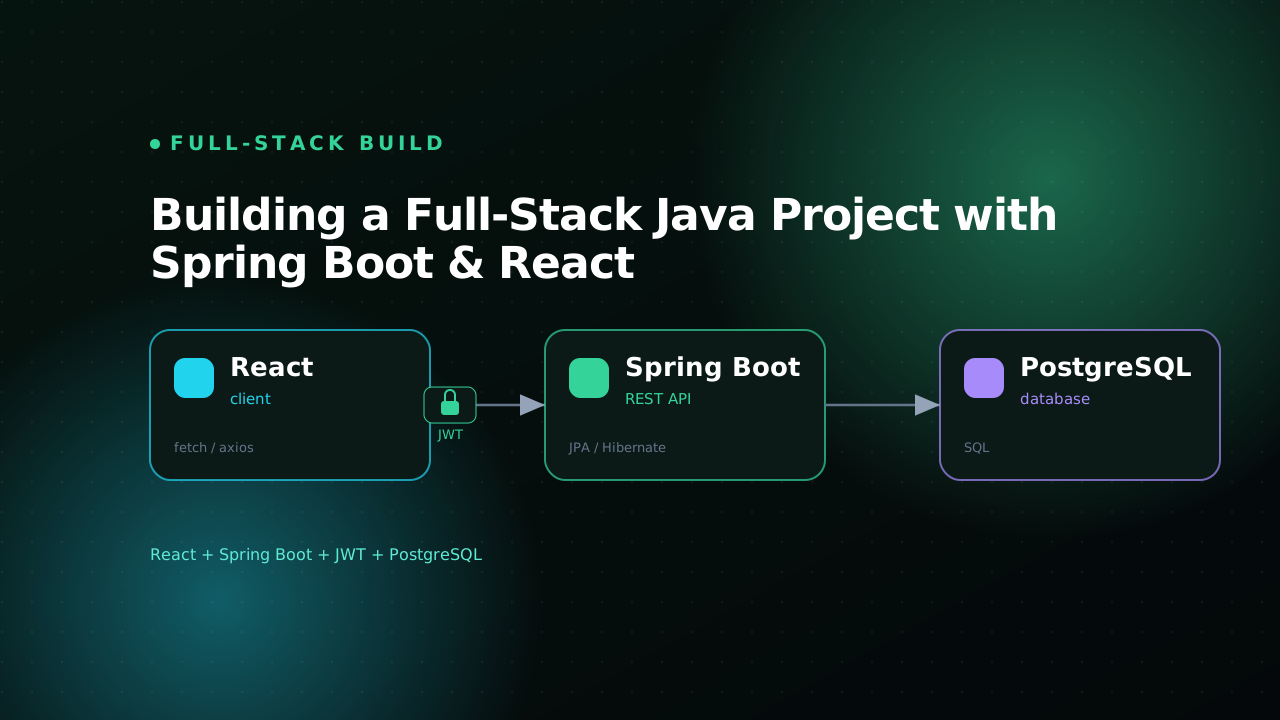
Most "full-stack Java" tutorials stop at a @RestController that returns "Hello World" and a React component that fetches it. The gap between that toy demo and something you would actually put in front of users is where every interesting decision lives: how the two halves talk to each other, where the auth token gets stored, how you keep the database schema honest across a team, and how you kill CORS pain in development without punching holes in production.
I build this exact stack for real projects - Spring Boot on the backend, React on the frontend, PostgreSQL underneath, JWT for stateless auth. I keep coming back to it because each piece is boring in the best way: well documented, battle tested, and easy to hire for. None of it is fashionable, and that is the point. In this post I will wire the whole thing up end to end, with the decisions explained instead of glossed over.
We will build a small but complete vertical slice: a user registers, logs in, gets a signed token, and uses it to read and write their own data. Nothing here is a shortcut - every pattern scales straight into a much larger app.
The shape of the project
I keep the backend and frontend in one repository as two clearly separated modules. A monorepo gives you one place to clone, one issue tracker, and atomic commits when an API change needs a matching frontend change. You never end up with a frontend PR merged against a backend that does not exist yet.
project/
├── backend/            # Spring Boot (Maven)
│   ├── src/main/java/com/kalanalk/app/
│   │   ├── auth/       # controllers, JWT filter, security config
│   │   ├── user/       # entity, repository, service
│   │   └── config/     # CORS, beans
│   └── src/main/resources/
│       ├── application.yml
│       └── db/migration/   # Flyway SQL files
└── frontend/           # React (Vite)
    └── src/
        ├── api/        # fetch wrapper, typed endpoints
        ├── auth/       # context, hooks, guarded routes
        └── pages/
Spring Boot owns business logic, persistence, and security. React owns rendering and interaction. The contract between them is a JSON HTTP API and nothing else: no shared session state, no server-rendered HTML, no hidden coupling. That clean boundary is what makes the token-based approach work, and it lets the two halves be deployed, scaled, and reasoned about independently.
The backend: entities, repositories, services
Start with the domain. A Spring Data JPA entity maps a Java class to a table, and the repository gives you query methods for free.
@Entity
@Table(name = "users")
public class User {
    @Id
    @GeneratedValue(strategy = GenerationType.IDENTITY)
    private Long id;

    @Column(nullable = false, unique = true)
    private String email;

    @Column(name = "password_hash", nullable = false)
    private String passwordHash;

    @Enumerated(EnumType.STRING)
    @Column(nullable = false)
    private Role role = Role.USER;

    // getters and setters
}
public interface UserRepository extends JpaRepository<User, Long> {
    Optional<User> findByEmail(String email);
    boolean existsByEmail(String email);
}
Spring derives the SQL straight from the method names, so findByEmail becomes SELECT ... WHERE email = ? with no implementation to write or test. Resist the urge to push logic up into the controller. The controller's only job is to translate HTTP into a method call and back. Validation, password hashing, and business rules belong in a service.
@Service
public class AuthService {
    private final UserRepository users;
    private final PasswordEncoder encoder;
    private final JwtService jwt;

    public AuthService(UserRepository users, PasswordEncoder encoder, JwtService jwt) {
        this.users = users;
        this.encoder = encoder;
        this.jwt = jwt;
    }

    public String register(String email, String rawPassword) {
        if (users.existsByEmail(email)) {
            throw new EmailTakenException(email);
        }
        User user = new User();
        user.setEmail(email);
        user.setPasswordHash(encoder.encode(rawPassword));
        return jwt.issue(users.save(user));
    }
}
Two details that matter here. The password is hashed with encoder.encode before it ever touches the database, so a leaked dump never reveals a plaintext password. And the token is issued from the saved entity, which now carries its generated id - issuing from the pre-save object would put a null subject in your token.
Use constructor injection over field injection, every time. It makes dependencies explicit, keeps the class testable without spinning up a Spring context, and lets you mark every field
final. There is a free design review baked in too: if a constructor grows to eight parameters, that is the class telling you it does too much. Listen to it and split it.
Validating input before it reaches your service
The controller is thin, but it is also your boundary against garbage input. Bean Validation lets you declare the rules on a DTO and have Spring enforce them before your service method is ever called.
public record RegisterRequest(
        @Email @NotBlank String email,
        @Size(min = 8, max = 100) String password) {}

@RestController
@RequestMapping("/api/auth")
public class AuthController {
    private final AuthService auth;

    public AuthController(AuthService auth) {
        this.auth = auth;
    }

    @PostMapping("/register")
    public TokenResponse register(@Valid @RequestBody RegisterRequest req) {
        return new TokenResponse(auth.register(req.email(), req.password()));
    }
}
A blank email or a five-character password now fails fast with a 400, and your service can assume the data it receives is structurally sane. Pair this with an @RestControllerAdvice exception handler so EmailTakenException and validation failures return clean, predictable JSON error bodies instead of a stack trace.
JWT auth without the foot-guns
JWT (JSON Web Token) gives you stateless auth: the server signs a token at login, the client sends it on every request, and the server verifies the signature instead of looking anything up in a session store. That is the appeal and also the trap, because a token you have signed is hard to revoke before it expires.
My defaults are conservative. Keep the access token short-lived, around 15 minutes. Put only an identifier and a role in the claims, never the password hash or anything sensitive, because the payload is just base64 and fully readable by anyone holding the token. And sign with a strong secret loaded from the environment, never hardcoded into the jar.
@Service
public class JwtService {
    private final SecretKey key;
    private final long ttlMillis = Duration.ofMinutes(15).toMillis();

    public JwtService(@Value("${app.jwt.secret}") String secret) {
        this.key = Keys.hmacShaKeyFor(secret.getBytes(StandardCharsets.UTF_8));
    }

    public String issue(User user) {
        Instant now = Instant.now();
        return Jwts.builder()
                .subject(user.getId().toString())
                .claim("role", user.getRole().name())
                .issuedAt(Date.from(now))
                .expiration(Date.from(now.plusMillis(ttlMillis)))
                .signWith(key)
                .compact();
    }

    public Long parseUserId(String token) {
        return Long.valueOf(
            Jwts.parser().verifyWith(key).build()
                .parseSignedClaims(token).getPayload().getSubject());
    }
}
A small filter pulls the token off the Authorization header, verifies it, and tells Spring Security who the user is. It runs once per request, before any controller.
@Component
public class JwtAuthFilter extends OncePerRequestFilter {
    private final JwtService jwt;
    private final UserRepository users;

    @Override
    protected void doFilterInternal(HttpServletRequest req, HttpServletResponse res,
                                    FilterChain chain) throws ServletException, IOException {
        String header = req.getHeader("Authorization");
        if (header != null && header.startsWith("Bearer ")) {
            try {
                Long userId = jwt.parseUserId(header.substring(7));
                users.findById(userId).ifPresent(user -> {
                    var auth = new UsernamePasswordAuthenticationToken(
                        user, null,
                        List.of(new SimpleGrantedAuthority("ROLE_" + user.getRole())));
                    SecurityContextHolder.getContext().setAuthentication(auth);
                });
            } catch (JwtException ignored) {
                // invalid or expired token: leave the context unauthenticated
            }
        }
        chain.doFilter(req, res);
    }
}
Then the security config wires the filter in and declares which routes are public. With Spring Security 6 this is a single SecurityFilterChain bean.
@Configuration
@EnableWebSecurity
public class SecurityConfig {
    @Bean
    SecurityFilterChain chain(HttpSecurity http, JwtAuthFilter jwtFilter) throws Exception {
        http
            .csrf(AbstractHttpConfigurer::disable)
            .sessionManagement(s -> s.sessionCreationPolicy(SessionCreationPolicy.STATELESS))
            .authorizeHttpRequests(auth -> auth
                .requestMatchers("/api/auth/**").permitAll()
                .anyRequest().authenticated())
            .addFilterBefore(jwtFilter, UsernamePasswordAuthenticationFilter.class);
        return http.build();
    }

    @Bean
    PasswordEncoder passwordEncoder() {
        return new BCryptPasswordEncoder();
    }
}
Disabling CSRF is correct here precisely because we are stateless and token-based: there is no session cookie for a cross-site request to ride on. The moment you decide to store the token in a cookie instead, that calculus flips and you need CSRF protection back. When a token is misbehaving and you cannot tell why, paste it into the JWT decoder - you will see the exact claims and expiry you are shipping, which usually surfaces the bug in seconds.
PostgreSQL and migrations you can trust
Letting Hibernate auto-generate your schema with ddl-auto: update is fine for the first afternoon and a liability after that. It silently drifts, it never drops anything, and it leaves you no record of how the schema actually evolved. Use real migrations instead. I reach for Flyway: plain SQL files, run in order, each one recorded in a flyway_schema_history table.
-- V1__create_users.sql
CREATE TABLE users (
    id            BIGINT GENERATED ALWAYS AS IDENTITY PRIMARY KEY,
    email         VARCHAR(255) NOT NULL UNIQUE,
    password_hash VARCHAR(255) NOT NULL,
    role          VARCHAR(20)  NOT NULL DEFAULT 'USER',
    created_at    TIMESTAMPTZ  NOT NULL DEFAULT now()
);
Then set Hibernate to validate rather than modify, so the app fails loudly at startup if your entities and your schema ever disagree:
spring:
  datasource:
    url: ${DB_URL:jdbc:postgresql://localhost:5432/app}
    username: ${DB_USER:app}
    password: ${DB_PASSWORD:app}
  jpa:
    hibernate:
      ddl-auto: validate
    properties:
      hibernate.format_sql: true
app:
  jwt:
    secret: ${JWT_SECRET}
Every schema change becomes a new numbered file checked into git. A teammate pulls, runs the app, and their database catches up automatically with zero manual SQL. That reproducibility is worth far more than the few minutes the migration file costs you. When a migration's SQL grows gnarly with joins and constraints, I tidy it in the SQL formatter before committing so the diff stays reviewable.
Connecting React: one fetch wrapper to rule them all
On the frontend, do not scatter raw fetch calls with hand-built headers across thirty components. Centralize it. One module attaches the token, sets the content type, and handles the 401-means-logged-out case in exactly one place, so an auth change is a one-line edit instead of a find-and-replace.
const BASE = import.meta.env.VITE_API_URL ?? "/api";

export async function apiFetch<T>(path: string, options: RequestInit = {}): Promise<T> {
  const token = localStorage.getItem("token");
  const res = await fetch(`${BASE}${path}`, {
    ...options,
    headers: {
      "Content-Type": "application/json",
      ...(token ? { Authorization: `Bearer ${token}` } : {}),
      ...options.headers,
    },
  });

  if (res.status === 401) {
    localStorage.removeItem("token");
    window.location.href = "/login";
    throw new Error("Unauthorized");
  }
  if (!res.ok) throw new Error(`Request failed: ${res.status}`);
  return res.json() as Promise<T>;
}
Auth state belongs in a context so any component can read the current user and any component can trigger login or logout. In most apps this is the one piece of genuinely global state worth a context.
const AuthContext = createContext<AuthState | null>(null);

export function AuthProvider({ children }: { children: React.ReactNode }) {
  const [token, setToken] = useState(() => localStorage.getItem("token"));

  async function login(email: string, password: string) {
    const { token } = await apiFetch<{ token: string }>("/auth/login", {
      method: "POST",
      body: JSON.stringify({ email, password }),
    });
    localStorage.setItem("token", token);
    setToken(token);
  }

  function logout() {
    localStorage.removeItem("token");
    setToken(null);
  }

  return (
    <AuthContext.Provider value={{ isAuthed: !!token, login, logout }}>
      {children}
    </AuthContext.Provider>
  );
}
A word on where that token lives. localStorage is simple and survives a refresh, but it is readable by any JavaScript on the page, which makes it a target for XSS. An httpOnly cookie is safer against XSS but reintroduces CSRF concerns and more server plumbing. For most internal apps and side projects, localStorage plus a short token TTL plus a strict content-security policy is a reasonable trade. The point is not which one is universally correct - it is that you can say out loud which one you chose and why.
Killing the CORS problem in development
In development the React dev server runs on port 5173 and Spring on 8080. A browser treats those as different origins and blocks the requests unless the server explicitly opts in. You have two clean options, and I prefer the second.
The first is to enable CORS on the backend for the dev origin:
@Bean
CorsConfigurationSource corsConfigurationSource() {
    var config = new CorsConfiguration();
    config.setAllowedOrigins(List.of("http://localhost:5173"));
    config.setAllowedMethods(List.of("GET", "POST", "PUT", "DELETE"));
    config.setAllowedHeaders(List.of("Authorization", "Content-Type"));
    var source = new UrlBasedCorsConfigurationSource();
    source.registerCorsConfiguration("/**", config);
    return source;
}
The second is to proxy API calls through the dev server so the browser only ever sees one origin. Add this to vite.config.ts and every /api request quietly forwards to Spring:
export default defineConfig({
  plugins: [react()],
  server: {
    proxy: { "/api": "http://localhost:8080" },
  },
});
I prefer the proxy because it makes development mirror production, where the frontend and the API are usually served from the same origin behind a reverse proxy anyway. There is no CORS config to maintain, no allow-list to forget to update, and far fewer surprises the day you deploy.
How a single request flows end to end
It helps to hold the whole path in your head at once:
- The user submits the login form. React calls
login(), which POSTs to/api/auth/login. - Spring's
AuthControllerhands off toAuthService, which looks up the user, checks the password with BCrypt, and asksJwtServiceto sign a token. - The token comes back as JSON. React stores it and updates the auth context, so the UI re-renders as logged in.
- The user opens a protected page. React fires
apiFetch("/api/me")with anAuthorization: Bearerheader. JwtAuthFilterverifies the signature, loads the user, and populates the security context. The controller runs, returns data, React renders it.
Every protected request after login repeats steps 4 and 5. There is no server-side session and no need for sticky load balancing - any instance can verify any token, because verification is just a signature check against a shared secret. That horizontal scalability is the real payoff for the upfront wiring.
Where to go from here
This slice is small on purpose, but the bones are production-shaped: a layered backend, real migrations, validated input, stateless auth, and a single typed API client. The natural next steps are refresh tokens so users are not bounced every 15 minutes, role-based route guards on both ends, and integration tests with Testcontainers spinning up a real PostgreSQL so you test against the database you actually ship.
Build the slice first and resist adding features until login works end to end. Once a request can travel from a React form to a Postgres row and back with a verified identity attached, everything else is genuinely just more of the same pattern applied. If you want to see what I have shipped on this stack, take a look at my projects, and if you are building something similar and want to compare notes, get in touch.
Read next
All posts
How to Become a Java & Spring Boot Developer in Sri Lanka
A practical roadmap to becoming a Java and Spring Boot developer in Sri Lanka - skills, projects, and how to stand out.

Building this portfolio: motion, shaders, and a CMS
A quick tour of how this site is put together - Next.js 16, Framer Motion, a WebGL hero, and a Supabase-backed admin for projects, blog, and tools.
Java Interview Questions & Answers (Core Java + Spring Boot)
Common Java interview questions and clear answers - core Java, collections, streams, and Spring - for junior developer roles.